
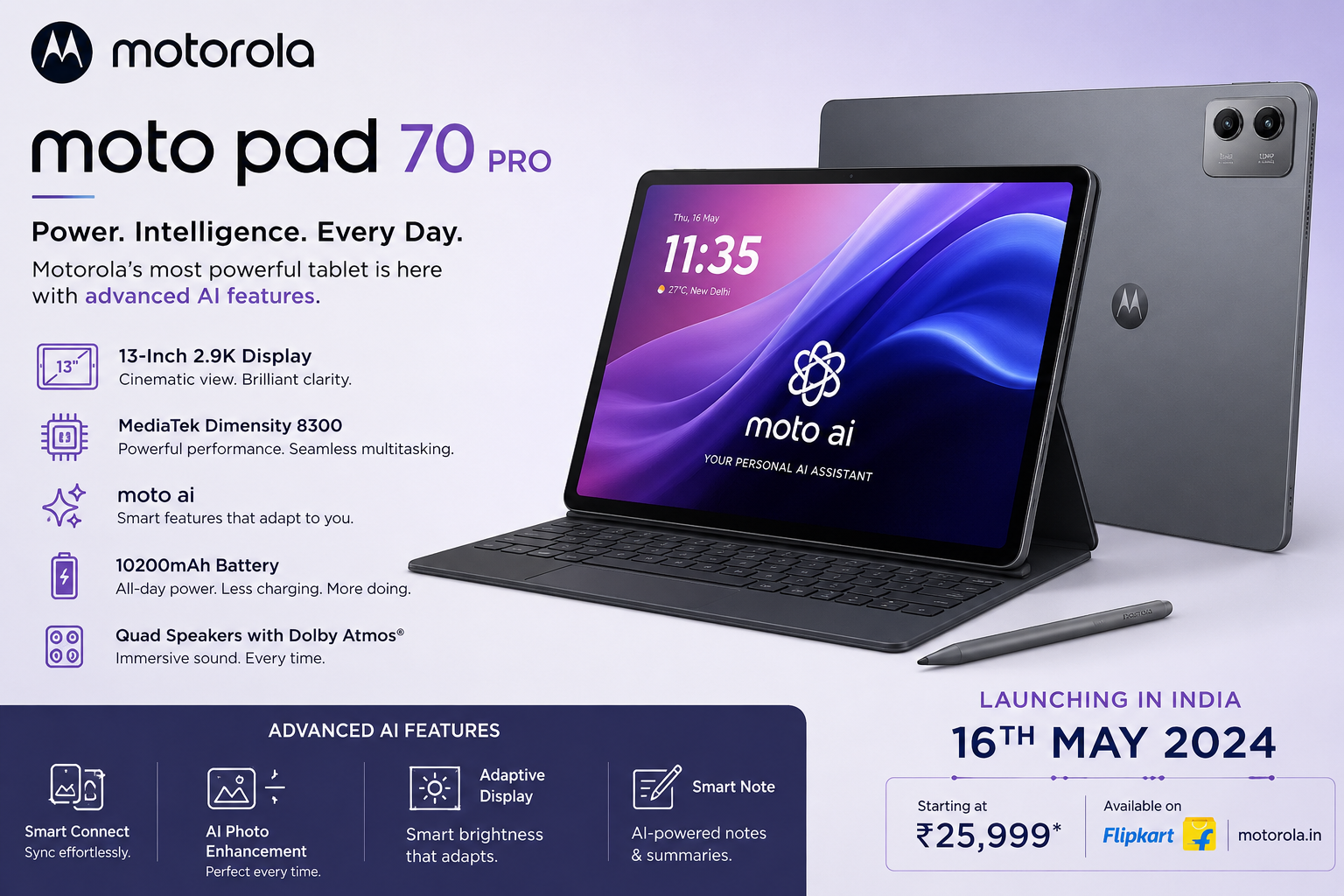
The premium Android tablet market just got a massive shake-up. Motorola has officially expanded its device portfolio in India with the unveiling of its latest flagship-grade tablet, the Motorola Moto Pad 70 Pro. Arriving as the direct successor to last year’s Moto Pad 60 Pro, this brand-new device is specifically engineered to cater to students, professionals, and digital content creators who refuse to compromise on performance, screen real estate, or modern productivity tools.
Packed with Qualcomm’s next-generation silicon, a stunning ultra-smooth display, a massive battery, and an array of cutting-edge artificial intelligence features, this tablet positions itself as a dominant force in its price segment. Let’s dive deep into the full specifications, software longevity, ecosystem perks, and actual retail pricing of this newly launched powerhouse.
Design and Display: Immersive, Ultra-Thin, and Premium
Motorola has pulled out all the stops to ensure that this large-screen tablet remains highly portable and exceptionally comfortable to hold. Despite housing massive internal components and a giant battery cell, the device features a sleek, premium metal unibody design.
Dimensions and Aesthetics
Thickness: An incredibly sleek 6.2 mm profile.
Weight: Weighs in at a balanced 589 grams, making it light enough for extended handheld reading or media consumption.
Color Availability: The tablet arrives in a single, sophisticated Pantone Titan color option, giving it a minimalist and highly professional aesthetic.
The 13-Inch Entertainment and Work Canvas
The centerpiece of the device is undoubtedly its expansive 13-inch 3.5K display. While initial announcements left the panel technology ambiguous, detailed launch specifications confirm it is a highly optimized, high-density LCD panel boasting a crisp pixel density of 319 ppi.
Whether you are editing high-resolution photos, scrubbing through a timeline, or scrolling through massive spreadsheets, the 144Hz refresh rate ensures an buttery-smooth fluid visual experience.
Furthermore, the display is a dream for media enthusiasts. It supports a 12-bit color depth capable of rendering billions of colors, complies with Dolby Vision standards for high-dynamic-range content, and hits a Peak High Brightness Mode (HBM) of 800 nits, ensuring excellent legibility even under harsh indoor or bright outdoor environments.
Performance: The Snapdragon 8s Gen 4 Breakthrough
Under the hood, the tablet is one of the very first devices to leverage the raw power of Qualcomm’s Snapdragon 8s Gen 4 SoC. Built on a cutting-edge architectural process, this chipset provides flagship-level processing capabilities while prioritizing thermal efficiency and battery preservation.
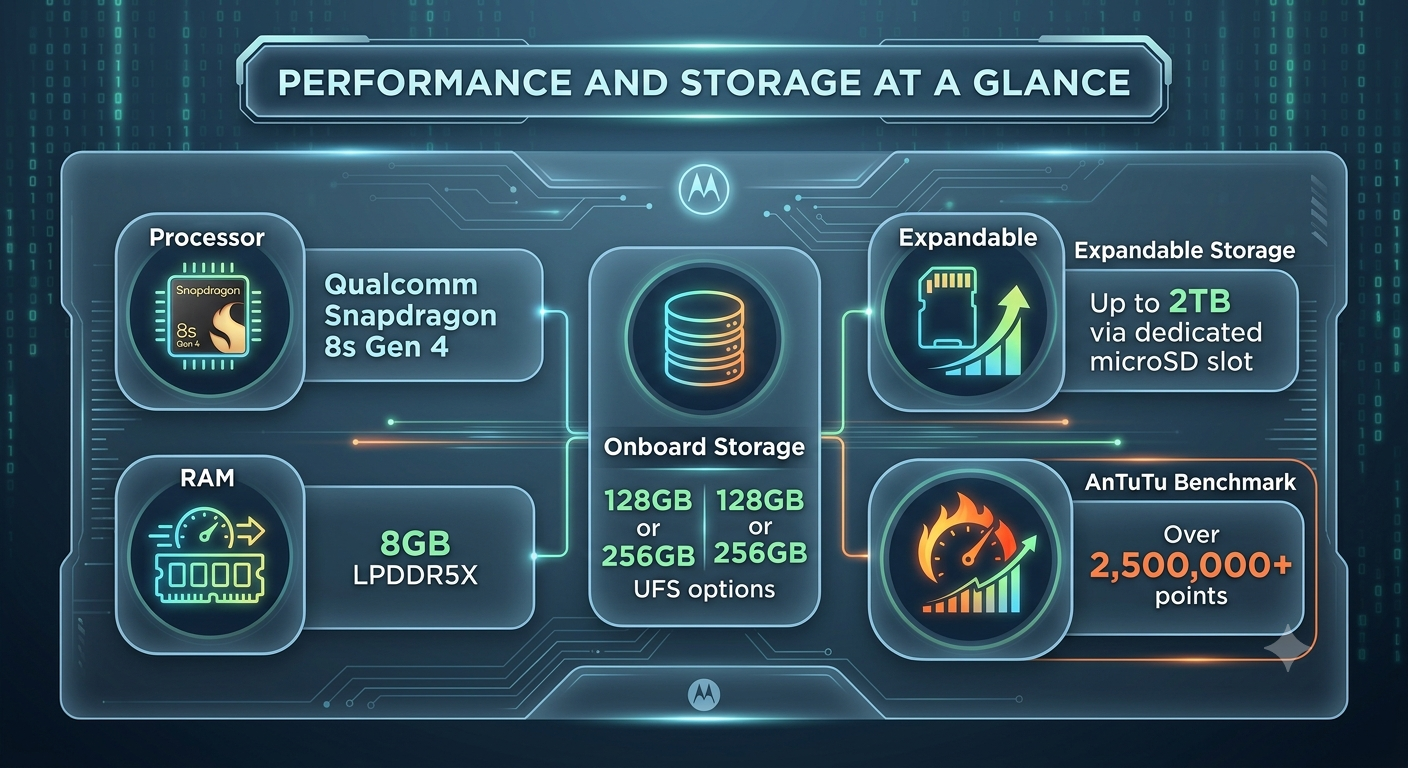
To put this performance into perspective, Motorola proudly highlights that the device achieves a blistering score of over 2.5 million points on the AnTuTu benchmark. For end-users, this means the tablet handles intense multitasking, high-end 3D rendering, and heavy productivity software without breaking a sweat.
For gamers, the hardware is fully optimized to support 120FPS gaming on major AAA mobile titles. Thermal throttling is kept to a absolute minimum, allowing mobile gamers to sustain high framerates during extended gaming sessions.
Software, Updates, and the Smart Connect Ecosystem
A common complaint among Android tablet buyers has historically been lackluster software optimization and short-lived update lifecycles. Motorola addresses this head-on with a competitive software commitment.
Android 16 and Future Upgrades
The tablet runs Android 16 out of the box, bringing the absolute latest privacy controls, UI customizability, and large-screen optimizations right to your fingertips. Motorola has officially committed to providing major OS upgrades all the way through Android 17 and Android 18.
Beyond the core platform upgrades, the company is promising a robust timeline for enterprise and data protection, ensuring consistent security updates until the year 2030. This extensive support window significantly enhances the long-term value of the investment for families and enterprise clients alike.
Cross-Device Synergy with Smart Connect
To build a cohesive hardware ecosystem, Motorola has baked its advanced Smart Connect software suite into the tablet. This platform enables frictionless cross-device connectivity across compatible Motorola smartphones, tablets, and Windows-based PCs.
Users can seamlessly share files wirelessly with a simple drag-and-drop action, mirror their smartphone screens onto the larger 13-inch display, use the tablet as a secondary monitor for their laptop, or share a clipboard instantly across multiple active devices.
AI Productivity Tools: The Moto Pen Pro Advantage
Artificial intelligence is woven deeply into the fabric of this tablet’s user experience. Rather than treating AI as a marketing gimmick, Motorola has introduced highly practical, localized productivity utilities that take advantage of the Snapdragon NPU (Neural Processing Unit).
Inside the Box: The Moto Pen Pro
Unlike competitor brands that charge a steep premium for an active stylus, Motorola includes the Moto Pen Pro right in the retail box. This low-latency active stylus unlocks a suite of creative and analytical tools:
Smart Capture & Sketch to Image: Ideal for designers and concept artists. Sketch a rough outline or a basic drawing, and the on-device AI will assist in rendering it into a clean, fully realized digital artwork or vector graphic.
AI Super Res: Enhances low-resolution cropped images, sketches, or scanned text documents into crystal-clear high-definition assets instantly.
AI Live Transcript: Perfect for students attending lectures or professionals sitting in corporate meetings. The tablet listens to real-time audio and creates accurate, time-stamped text transcriptions instantly.
Smarter Reader & AI Notes: These tools can instantly summarize massive PDF textbooks, translate foreign languages in real time, generate logical explanations for complex concepts, and automatically categorize and organize handwritten notes.
Transformative Laptop Experience: Desk Mode and Keyboards
While the tablet operates as an excellent handheld slate, it is designed to seamlessly transform into a fully functional workstation.
Desk Mode and PC Interface
When you need to get serious work done, switching into the built-in Desk Mode or PC Mode changes the user interface into a familiar, desktop-like environment. This system supports overlapping resizable windows, a taskbar for quick app switching, advanced multi-window docking, and native integration with productivity suites like WPS Office.
The Snap-On Keyboard
To complete the mobile office transformation, users can pair the device with the custom-designed Snap-On Keyboard (sold either as a bundle or as a standalone accessory).
The keyboard features an integrated Smart Key dedicated specifically to triggering on-device AI shortcuts, launching your favorite assistant, or summarizing your active screen with a single click. It also features a comfortable key travel and an integrated multi-gesture trackpad.
Battery Life, Charging, and Hardware Connectivity
When you are working on the go, battery anxiety can destroy productivity. Motorola has mitigated this by integrating an exceptionally dense battery array into the thin chassis.
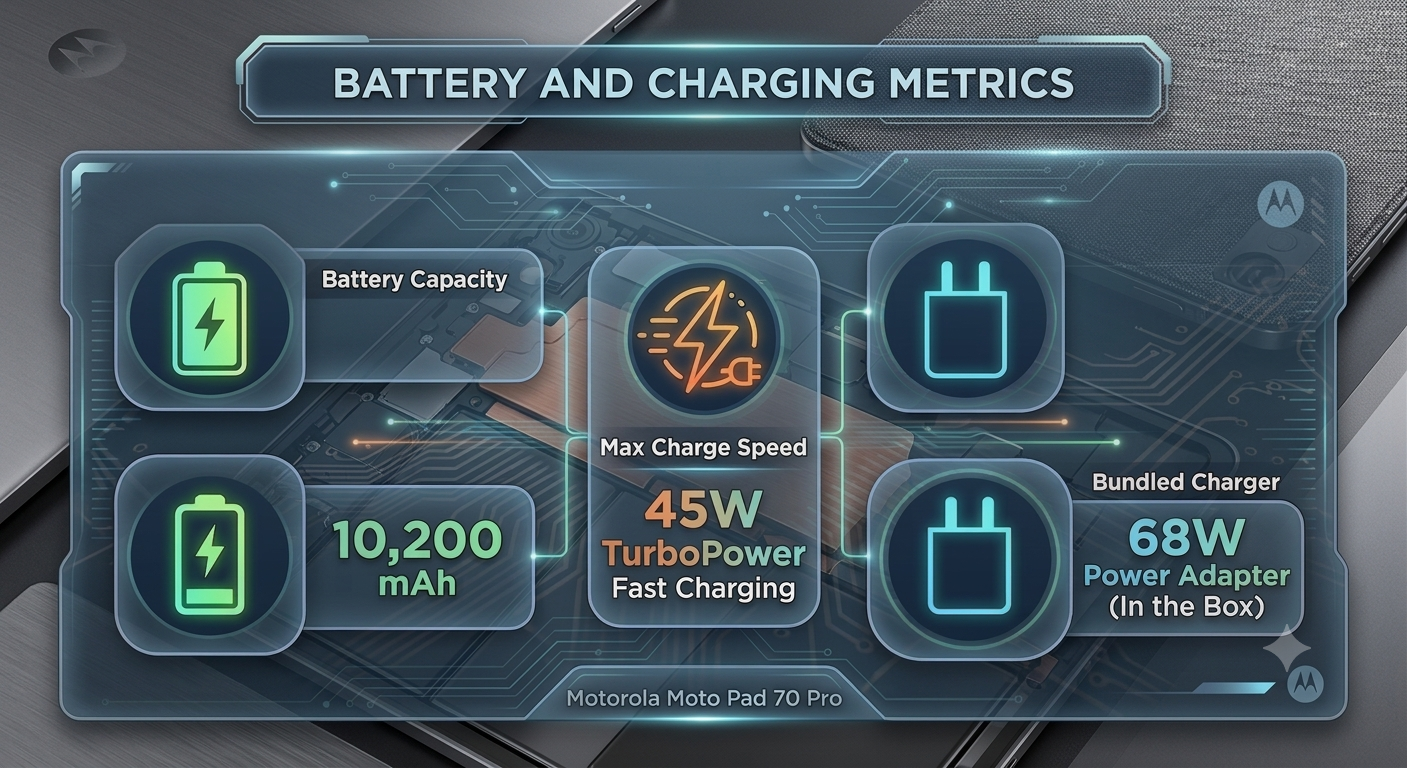
Interestingly, while the tablet’s internal charging circuitry maxes out at 45W TurboPower fast charging, Motorola generously includes a higher-capacity 68W power adapter inside the box. This means you can use the bundled charger to fast-charge your compatible smartphones or laptops as well.
Audio, Camera, and Modern Connectivity Features
Immersive Audio: The tablet is equipped with a premium quad JBL speaker setup tuned precisely with Dolby Atmos spatial audio, offering deep bass and clear vocals for streaming shows or joining video conferences.
Camera Configuration: For video calls, online classes, and basic scanning, the device features an 8MP front-facing camera optimally placed on the landscape bezel, alongside a crisp 13MP rear camera on the back panel.
Wireless Protocols: The tablet is future-proofed with state-of-the-art Wi-Fi 7 and Bluetooth 6.0 protocols, guaranteeing lightning-fast internet speeds, low latency, and stable connection to wireless earbuds or accessories.
Cellular Disclaimer: Note that this specific iteration of the tablet is a pure Wi-Fi model and does not feature built-in LTE or 5G cellular SIM slots.
Complete Specifications Matrix
For a quick reference of everything this modern Android tablet has to offer, review the comprehensive technical specifications detailed below:
| Feature | Specification Details |
| Display | 13.0-inch LCD, 3.5K Resolution, 319 ppi, 12-bit Color Depth |
| Refresh Rate | 144Hz |
| Brightness | 800 nits Peak High Brightness Mode (HBM) |
| Processor | Qualcomm Snapdragon 8s Gen 4 |
| RAM | 8GB |
| Storage Options | 128GB / 256GB (Expandable up to 2TB via MicroSD) |
| Operating System | Android 16 (Upgrades promised up to Android 18) |
| Security Support | Patches guaranteed until 2030 |
| Rear Camera | 13 Megapixels |
| Front Camera | 8 Megapixels |
| Battery Capacity | 10,200 mAh |
| Charging | 45W Charging Support (68W Charger included in box) |
| Audio | Quad JBL Speakers, Dolby Atmos Tuning |
| Connectivity | Wi-Fi 7, Bluetooth 6.0, Smart Connect Ecosystem |
| Stylus | Moto Pen Pro (Included in the box) |
| Dimensions & Weight | 6.2 mm thin | 589 grams |
Indian Pricing, Launch Offers, and Availability
Motorola has priced this tablet highly aggressively in the Indian sub-continent to challenge existing mid-to-high-range tablet offerings. Sales officially kick off across India starting July 4. The device will be readily accessible via Flipkart, Motorola’s official website (Motorola.in), and authorized leading offline brick-and-mortar retail stores across the country.
The tablet comes in two distinct standalone memory configurations, alongside an official productivity hardware bundle:
8GB RAM + 128GB Storage Variant: Launched at an official retail price of INR 36,999.
8GB RAM + 256GB Storage Variant: Launched at an official retail price of INR 39,999.
The Ultimate Productivity Bundle (8GB + 256GB Model + Snap-On Keyboard): Priced at an attractive combined bundle cost of INR 45,999.
Note on Standalone Accessory: If you buy the 256GB variant initially and choose to buy the Snap-On Keyboard separately down the line, it will cost INR 5,999.
Limited-Period Launch Discount Offer
To make the deal even sweeter for early adopters, Motorola has partnered with ICICI Bank for a special introductory launch promotion. Customers purchasing the device using an eligible ICICI Bank card can instantly claim a flat discount of INR 4,000.
Deal Alert: This limited-period bank offer effectively slashes the entry price of the base model down to an incredibly competitive INR 32,999, making it an absolute steal given the inclusion of the premium Snapdragon silicon and the bundled active stylus pen.
Final Verdict: Is it Worth It?
The premium tablet ecosystem is no longer just a two-horse race. By packing a highly capable Snapdragon 8s Gen 4 chipset, an incredibly fluid 144Hz 3.5K display, extensive software update security until 2030, and high-value inclusions like the Moto Pen Pro stylus directly in the retail box, Motorola has built a compelling device.
If you are looking for an ultra-thin, AI-driven machine for heavy office work, academic studies, or high-end mobile entertainment without breaking the bank, this new device deserves a spot at the top of your consideration list when it hits the shelves this July.
Disclaimer
The information provided on this website is for general informational and educational purposes only. While we strive to ensure that all technical specifications, pricing, launch dates, and software details regarding the Motorola Moto Pad 70 Pro are accurate and up-to-date at the time of publication, retail details, banking promotions, and product availability are subject to change by the manufacturer or retail partners without prior notice.